From Someone Who Doesn’t (Didn’t) Have a Clue
I don’t know why you clicked on this when I admitted in the sub-title that I don’t have a clue. Fortunately for both of us, my friends are pretty savvy. They shared with me some great tips that I want to pass along. I hope you clicked on this because you have been playing around with the idea of making videos of yourself, but it feels a bit confusing, intimidating or daunting. You could spend time and money on classes and expert advice, but sometimes those are so technical and advanced that they can go straight over our heads.
Sometimes, simpler is better.
I put bravado aside and went to Facebook, hat in hand, and asked my friends, after sharing a first-sample effort.
In the video production world, design and editing based offenses are considered especially heinous. In Stoneking Strategic Communications, the dedicated owner and principal who crafts these vicious videos relies on members of an elite squad known as Facebook Friends. [This should be read in the voiceover tone from the introduction to Law & Order SVU].
Without further ado – by the way, isn’t saying without further ado in itself a further ado – here is what I learned. All easy, quick, and extremely helpful.
Camera height. I got the most comments here. Raise the camera higher. As one person told me, nobody wants to look at your nostrils. I have very nice nostrils, but I get it. The first time I corrected this I simply put my camera on a stack of books. Then I learned that my $19.00 adjustable round selfie light had a mount for it.
Adjustable Round Selfie Light. Is it déjà vu or were we just talking about this? It is a cheap investment and really works well. If you have great natural lighting, then no worries. But if not, this is such an easy fix, and the only financial expense in this entire list.
Horizontal. This probably should have been a no-brainer for me, but I can be a little slow at the uptake. When it comes to technology, I was born three bricks short of a load. If you set your background right, this can save dead space and will look more like television and film.
Background. Did someone just mention background? The way these segues are flying around is crazy sauce. My first effort had several things hanging on the wall and shelf behind me. I got rid of most. Opinions did vary on what to keep. As a newly published author, I decided to have a copy of my new book in plane site. Unfortunately, in selfie mode, the words read backwards.
Mirror. When you complete your video, you can make several edits without any additional software. One click and the entire video is in mirror mode and the letters all flow in the right direction. My book now reads forwards.
Edits. You can play with other things like color and lighting. I don’t. But the one tip I learned on my own is that right on the phone I can edit out both the beginning and the end of the video. This comes in handy when you need to reach to turn on and off your phone but don’t want your arm seen doing that. I count to myself to three seconds at the beginning and end to make sure I have room to play with. Then I go back into the video and just move the start and ending lines to where it makes sense.
Length. The advice I received here ranged from 30 seconds to 2:00 minutes. I love brevity but have not (yet) found something profound to say in 30 seconds. My average has been about 1:30 and I have received positive feedback. In the corporate video world, you will likely have to be precise at 30/60/90. But for us regular folk, don’t worry if it is a 1:19 or 1:41. Make the content compelling and nobody will care.
Sound. In the first video I tried, Fiji was chewing on a squeaky toy right next to me. This was an easy fix. I gave her a bone. A few people cautioned me about filming outside because of the noise of wind and traffic (unless I had special equipment). That’s the thing about advice. You get to choose which you abide and which you discard. I did one of my videos outside without special equipment right next to a major street. I thought it came off naturally and added to the ambience. Is ambience the right word?
Dress code. The opinions varied greatly here. Some called for nice clothes, others suggested being comfortable. Some liked my glasses on, some off. We could not even agree on whether I should be cleanly shaven. I decided to abide all of this feedback. If you make several videos, you get to experiment with different approaches. If someone turns of fone of my videos because they were not jiggy with my apparel, then I am not sure they were invested in the content anyway.
Titles. I received some great help here. You can title each video, but you can title your series as well. In my first one, I introduced the video with “I’m Dan Stoneking and THIS is Stoneking Crib Notes.” I capitalized THIS because I say it a little bit like how Ryan Seacrest announces American Idol. I mean, not as dramatic as him, but a little. My Ex told me that younger generations do not know what crib notes are and that I was dating myself. My daughter Chloe agreed and suggested I call it a Stoneking Short. I am also playing with a Stoneking Short Take. Thoughts? As far as the individual video title is concerned when you post it, you don’t want to give away the punchline. My video called “The 1996 Superbowl,” has virtually nothing to do with that game. Make the title creative, alluring, and a bit of a tease. Just don’t fall into the slippery slope of click bait.
Screenshot. Here is one I still need help with if anyone wants to reach out to me offline. Spoiler alert – when I posted the Superbowl video, the screenshot for the video came from the very end of the video, not the beginning. As a result, the punchline lost effectiveness for anyone who was paying attention to the screenshot. If you can help me learn how to choose my own screenshot (I would prefer the opening frame), I would appreciate that.
Hashtags. When you post, this is how you engage your audiences. One hashtag is likely not sufficient; twenty hashtags are annoying. It is worth keeping in mind that some of these will be the same for all of your videos. Depending on the specific example and content for each video, new temporary hashtags might be useful to add.
Where to Post. I received some contradictory ideas that I am working to resolve. Some say to post where people go. Tik Tok, for example, is a powerful platform. Others said I should put everything on my website and drive people to me. So far, I am doing both. I post to my website and share that link with Facebook and LinkedIn. I have been posting to YouTube and Tik Tok separately, but I am working to fix that and bring them all back to my site.
Mix it Up. This was my favorite piece of advice from my friend Rebecca. It reminded me to have fun and keep trying different things. I’m already looking forward to my next video.
I admitted from the outset that I don’t have a clue about the technology behind making videos. This is dedicated to the rest of you in my tribe. Try it. Mix it up. Have fun. As Olivia Benson says in Law and Order SVU, “Once you tell your story, it can be empowering.”
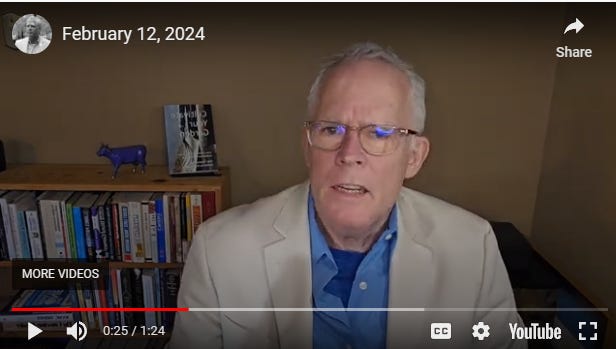
If you’re interested in seeing my first few tries to apply what my friends have taught me, you can find them here: Videos – Stoneking Strategic Communications (SSC) (danstoneking.com)
###
 Stoneking Strategic Communications (SSC)